
- Joined
- May 17, 2026
- Messages
- 28
- Reaction score
- 22
The settings in your profile can go a long way to making your time here better so here are some tips to make it work for you?
To get into your profile, click your name under the banner and pick an option. To view other's mini profile, hover over their avatar and it will pop up. To view their full public profile, click their username in the popup. More information on public profiles will follow below.
Without your own avatar, the system will assign a generic one with the first letter of your user name but this forum provides many customization options we urge you to take advantage of. This should help you get started...
Avatar and Profile Background Images
Avatars work best at 250 x 250 pixels
Profile backgrounds work best at 1280 x 300 pixels
If you need help resizing images or want someone to make one for you, please start a thread and share what you need there.
Account Details
Here you can customize your details and settings. Most of these details are visible to administrators and you only but some, such as your birthday and location if you choose to share them will be visible to others..
The most important settings you should review are under Privacy and Preferences and be sure to make sure your time zone is set correctly. We would prefer you leave the display of your online status and current activity as active but have left the option to hide available.
We have also left the option to customize your user title open replacing the default system title but if this gets abused, the option will be removed. If you do add your birthday, you can hide the year and your birthday can't be seen unless it's your birthday and the system puts your name in the sidebar. On the From field, you can put in your location and it will show From _____
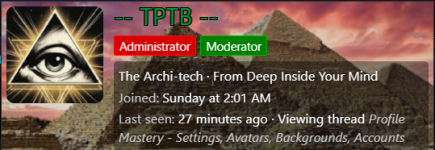
This is how it looks having all information provided show up on your mini profile
The default system settings will "watch" or subscribe to threads you create.
It will also automatically watch content you interact with such as other people's threads you post in.
We find the "watching" is fine and helpful but in many cases the email notifications of the things you're watching can be a little overwhelming so you may want to see how it goes for you and adjust accordingly.
Personally, I like getting a notice if someone posts in my thread, quotes me in a post or I get a direct message from someone.
The next thing you want to control is Alerts or you will be bombarded with them.
Under preferences, some are helpful and kind of fun but uncheck the ones you don't want or you might get too many?
You are in charge of posts on your profile. You can edit or delete your own or delete ones from others
To make a post or view someone's profile, hover their username for the pop up then click their user name. Bingo!
Please feel to ask questions if you need help. There's a lot of new stuff here but you'll soon get the hang of it.
To get into your profile, click your name under the banner and pick an option. To view other's mini profile, hover over their avatar and it will pop up. To view their full public profile, click their username in the popup. More information on public profiles will follow below.
Without your own avatar, the system will assign a generic one with the first letter of your user name but this forum provides many customization options we urge you to take advantage of. This should help you get started...
Avatar and Profile Background Images
Avatars work best at 250 x 250 pixels
Profile backgrounds work best at 1280 x 300 pixels
If you need help resizing images or want someone to make one for you, please start a thread and share what you need there.
Account Details
Here you can customize your details and settings. Most of these details are visible to administrators and you only but some, such as your birthday and location if you choose to share them will be visible to others..
The most important settings you should review are under Privacy and Preferences and be sure to make sure your time zone is set correctly. We would prefer you leave the display of your online status and current activity as active but have left the option to hide available.
We have also left the option to customize your user title open replacing the default system title but if this gets abused, the option will be removed. If you do add your birthday, you can hide the year and your birthday can't be seen unless it's your birthday and the system puts your name in the sidebar. On the From field, you can put in your location and it will show From _____
This is how it looks having all information provided show up on your mini profile
The default system settings will "watch" or subscribe to threads you create.
It will also automatically watch content you interact with such as other people's threads you post in.
We find the "watching" is fine and helpful but in many cases the email notifications of the things you're watching can be a little overwhelming so you may want to see how it goes for you and adjust accordingly.
Personally, I like getting a notice if someone posts in my thread, quotes me in a post or I get a direct message from someone.
The next thing you want to control is Alerts or you will be bombarded with them.
Under preferences, some are helpful and kind of fun but uncheck the ones you don't want or you might get too many?
Profile Posts
Posts on your and other's profiles are public. They are somewhat analogous to posting on someone's wall. You can make short comments on your own profile to update your status and do the same on other's. Profile posts show up in recent activity lists so it is easy to see other member's profile posts.You are in charge of posts on your profile. You can edit or delete your own or delete ones from others
To make a post or view someone's profile, hover their username for the pop up then click their user name. Bingo!
Please feel to ask questions if you need help. There's a lot of new stuff here but you'll soon get the hang of it.


