

- Joined
- May 17, 2026
- Messages
- 28
- Reaction score
- 22
-updated 29, May 2026 - new info about Tags added
Making threads, posts and replying to posts in threads is the heart of a discussion forum and this site doesn't work too differently than most people are already familiar with so it is easy to get going.
To create a new thread
Select the forum you want your thread to be in
At the top of any existing threads or empty forum, you will see two options
Both do exactly the same thing...almost. We recommend using the Post Thread button and here's why:
Using the Post Thread button automatically brings up important options at the bottom you can use before hitting post. Using the quick thread bar choice doesn't display the important options unless you click the "more options" button.
Seeing the options when creating a new thread really matter!
It gives you the option to automatically "watch" or subscribe to the thread and the next topic of this tutorial:
TAGS - NEW!
Tags are key points or ideas from the thread you are creating. You can add multiple tags separated by a comma. Any existing tags will appear after typing the first few letters and reusing an existing tag will boost its value in the Tag Cloud.
Example: for a thread like this one, I might add tags like "tutorial", "help", "new thread", "tags", "prefixes"' and so on.

* UPDATED INFO *
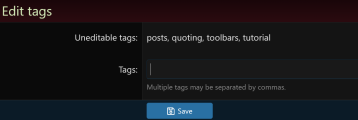
If you look closely, you will see the tag icon under a thread's title whether tags have been added or not. If you click the tag, you can add tags to your own thread if you forgot when creating it and you can add tags to other people's threads too, However, tags added by the original thread's author can only be edited or removed by that author.
Thread Prefixes
Thread prefixes are optional enhancements to your thread to improve its visibility or make a point. The drop down selector is next to your thread's title.
► Only the first post in a thread can have a prefix.
► If you have permissions to edit the first post in your thread, you can add or change the prefix after it has been posted
Please note: More prefixes can be added or by popular request, existing prefixes can be changed. Let an admin hear your suggestions.
We are here to help if you have questions or need a hand
.
Making threads, posts and replying to posts in threads is the heart of a discussion forum and this site doesn't work too differently than most people are already familiar with so it is easy to get going.
To create a new thread
Select the forum you want your thread to be in
At the top of any existing threads or empty forum, you will see two options
A Post Thread button and a quick thread bar prompting to post your thread title
Both do exactly the same thing...almost. We recommend using the Post Thread button and here's why:
Using the Post Thread button automatically brings up important options at the bottom you can use before hitting post. Using the quick thread bar choice doesn't display the important options unless you click the "more options" button.
Seeing the options when creating a new thread really matter!
It gives you the option to automatically "watch" or subscribe to the thread and the next topic of this tutorial:
TAGS - NEW!
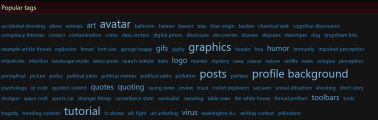
Tags are key points or ideas from the thread you are creating. You can add multiple tags separated by a comma. Any existing tags will appear after typing the first few letters and reusing an existing tag will boost its value in the Tag Cloud.
Example: for a thread like this one, I might add tags like "tutorial", "help", "new thread", "tags", "prefixes"' and so on.
Tags will appear in the first post of a thread under the title of the thread.
* UPDATED INFO *
If you look closely, you will see the tag icon under a thread's title whether tags have been added or not. If you click the tag, you can add tags to your own thread if you forgot when creating it and you can add tags to other people's threads too, However, tags added by the original thread's author can only be edited or removed by that author.
What are tags for anyway and how do they help?
- Click on Search in the nav bar
- Click on Advanced Search at the bottom
- Click on the "Search Tags" tab to see the Tag Cloud
Thread Prefixes
Thread prefixes are optional enhancements to your thread to improve its visibility or make a point. The drop down selector is next to your thread's title.
► Only the first post in a thread can have a prefix.
► If you have permissions to edit the first post in your thread, you can add or change the prefix after it has been posted
Please note: More prefixes can be added or by popular request, existing prefixes can be changed. Let an admin hear your suggestions.
We are here to help if you have questions or need a hand
.
Attachments

Last edited: